

If you have ADHD, you have probably downloaded a dozen productivity apps, used each for about three days, and then forgotten they existed. That is not a discipline problem. Most apps are built for neurotypical brains that remember to open them and enjoy ticking off boxes. The apps that actually work for ADHD do something different: they add structure, reminders, and rewards you cannot easily ignore.
This guide rounds up the best ADHD apps and tools for 2026, organized by the problem each one solves, from starting tasks to beating time blindness. Just as important, it covers how to choose one that sticks instead of joining your graveyard of abandoned apps.
How to Choose an ADHD App That Actually Helps
The most common mistake is picking the flashiest, most feature-packed app. For an ADHD brain, that usually backfires, because complex apps take energy to set up and maintain. The better approach is to start with your single biggest daily friction and find one tool that targets it.
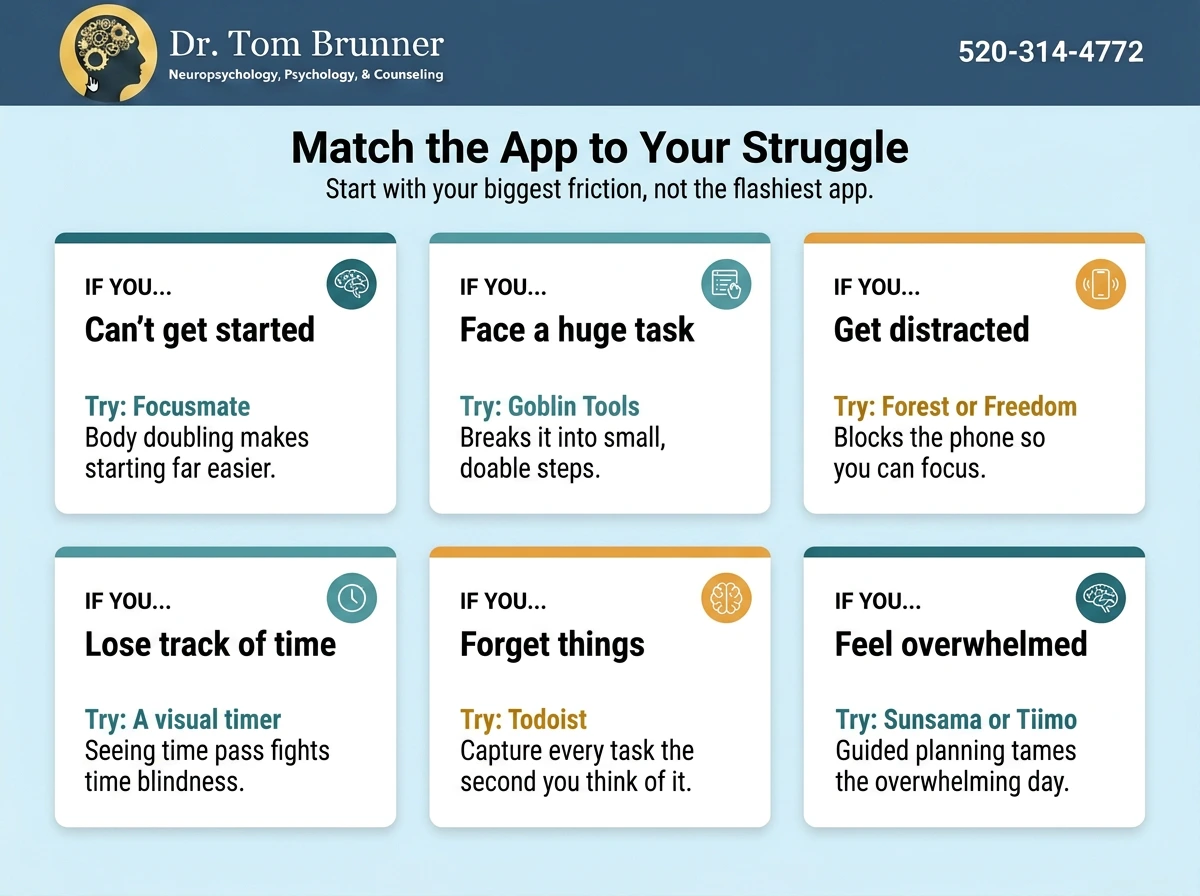
Two rules make a huge difference. First, pick one app per category, not five. ADHD brains love new tools, but spreading across many means you check none. Second, remember that apps are scaffolding, not a cure. They help you work with your wiring, but they do not replace treatment. With that in mind, here are the best options by category.
It also helps to know what makes an app ADHD-friendly in the first place. The best ones share a few traits: they let you capture a thought in seconds, they use visual cues and color so information is easy to scan, they send reminders you cannot easily dismiss, and they add a little reward or gamification to make dull tasks satisfying. If an app is fiddly, buries features in menus, or needs a long setup, it will likely end up abandoned no matter how powerful it is.
Best To-Do List and Task Apps
A good task app gets ideas out of your head fast, before they vanish. Todoist is the most-recommended pick: it is simple, works everywhere, has a solid free tier, and lets you type something like “email report Friday” and have it file itself. TickTick is a close cousin that adds calendar views and a built-in focus timer. If you want the simplest possible option, Google Tasks is free and already sits inside your email.
A standout for a very ADHD problem, staring at a task too big to start, is Goblin Tools. Its “Magic To-Do” uses AI to break any vague task into small, doable steps. Type “clean the kitchen” and it hands you a checklist you can actually begin. It is free on the web, and it pairs well with whatever list app you choose.
Best Focus and Body-Doubling Apps
When the struggle is starting and staying on task, body doubling is the standout strategy, and ADDA and CHADD both describe it as a technique many adults swear by. Focusmate pairs you with another person for a scheduled, camera-on work session; you each say your goal, then work quietly together. That gentle accountability makes starting far easier, and it offers a few free sessions each week. FLOWN offers a similar but group-based, facilitated version.
For distraction, Forest gamifies focus by growing a virtual tree that dies if you leave to scroll, a small but surprisingly effective dopamine nudge, and it is low-cost. Freedom takes a firmer approach, blocking distracting apps and websites entirely during work time. Simple Pomodoro timers, many of them free, round out the category by breaking work into focused sprints with built-in breaks.
Best Planner and Time-Management Apps
If your problem is time itself, planning tools help. Sunsama walks you through a guided daily plan each morning, pulling in your tasks and calendar and gently capping how much you take on, which tames overwhelm and overcommitting. Tiimo is a visual planner built specifically for ADHD brains, turning routines into a clear, color-coded timeline that makes time feel concrete.
You do not need anything fancy, though. A plain calendar like Google Calendar, with aggressive reminders set for a day before, an hour before, and fifteen minutes before, beats time blindness for many people. The best planner is the one you will actually look at.
ADHD-Specific Apps and Games
A few tools go beyond productivity to target ADHD directly. Inflow is a CBT-based app made for adult ADHD, with structured lessons, daily tools, and a community that tackles the deeper patterns like avoidance and shame, not just your to-do list.
On the gaming side, EndeavorOTC is worth knowing about because it is unusual: it is a video game cleared by the FDA to help improve attention in adults with ADHD, backed by clinical trials. Two important caveats: the FDA is clear that it is meant to be used alongside other treatment, not as a replacement, and it is a paid product. Be more skeptical of ordinary “brain-training” games that claim to boost focus. The evidence that they transfer to real life is mixed at best, so treat them as fun, not therapy.
Reminders, Trackers, and Other Handy Tools
Beyond the big categories, a few smaller tools solve specific ADHD headaches. For remembering things in the moment, a dedicated reminder app with persistent, repeating alerts works better than a single easy-to-swipe notification. Habit trackers can help routines stick, especially gamified ones like Habitica, which turns your habits into a role-playing game, or gentler options that reward consistency without piling on guilt when you miss a day.
For capturing thoughts before they evaporate, speed matters more than features. Voice-to-text notes let you dump an idea hands-free, and a simple notes app like Google Keep beats a powerful but complicated one you never open. Notion is beloved by some, but its blank-canvas flexibility can become a rabbit hole, so approach it with caution. A smartwatch can also help by putting reminders and timers right on your wrist, where they are harder to ignore than a buried phone.
Students have extra options worth knowing about. Assistive technology like text-to-speech readers, speech-to-text for writing, audiobooks, and distraction-blocking browser extensions can level the playing field, and many are free through schools. If you or your child is a student, ask the disability services office what tools and accommodations are available.
At-a-Glance Comparison
Here are the apps above side by side. Availability and pricing shift, so double-check before you download.
| App | Best for | Free option? |
|---|---|---|
| Todoist | Capturing and organizing tasks fast | Yes, free tier |
| TickTick | To-do list plus calendar and timers | Yes, free tier |
| Goblin Tools | Breaking big tasks into small steps | Yes, free on web |
| Focusmate | Body doubling to start and finish tasks | Yes, a few sessions a week |
| Forest | Gamified focus, less phone use | Low-cost, free on Android |
| Freedom | Blocking distracting apps and sites | Free trial, then paid |
| Sunsama | Guided daily planning, less overwhelm | Paid, with a trial |
| Tiimo | Visual routines and time awareness | Yes, free tier |
| Google Calendar and Tasks | Simple, free scheduling and lists | Yes, free |
| Inflow | CBT-based ADHD skills and community | Paid, with a trial |
| EndeavorOTC | An FDA-cleared game to boost attention | Paid |
Pricing and free tiers change frequently. Confirm the current details on each app before purchasing.
Making Apps Actually Stick
Finding the right app is only half the job. The real challenge for ADHD is still using it after the novelty wears off. These habits help a new tool survive past day three.
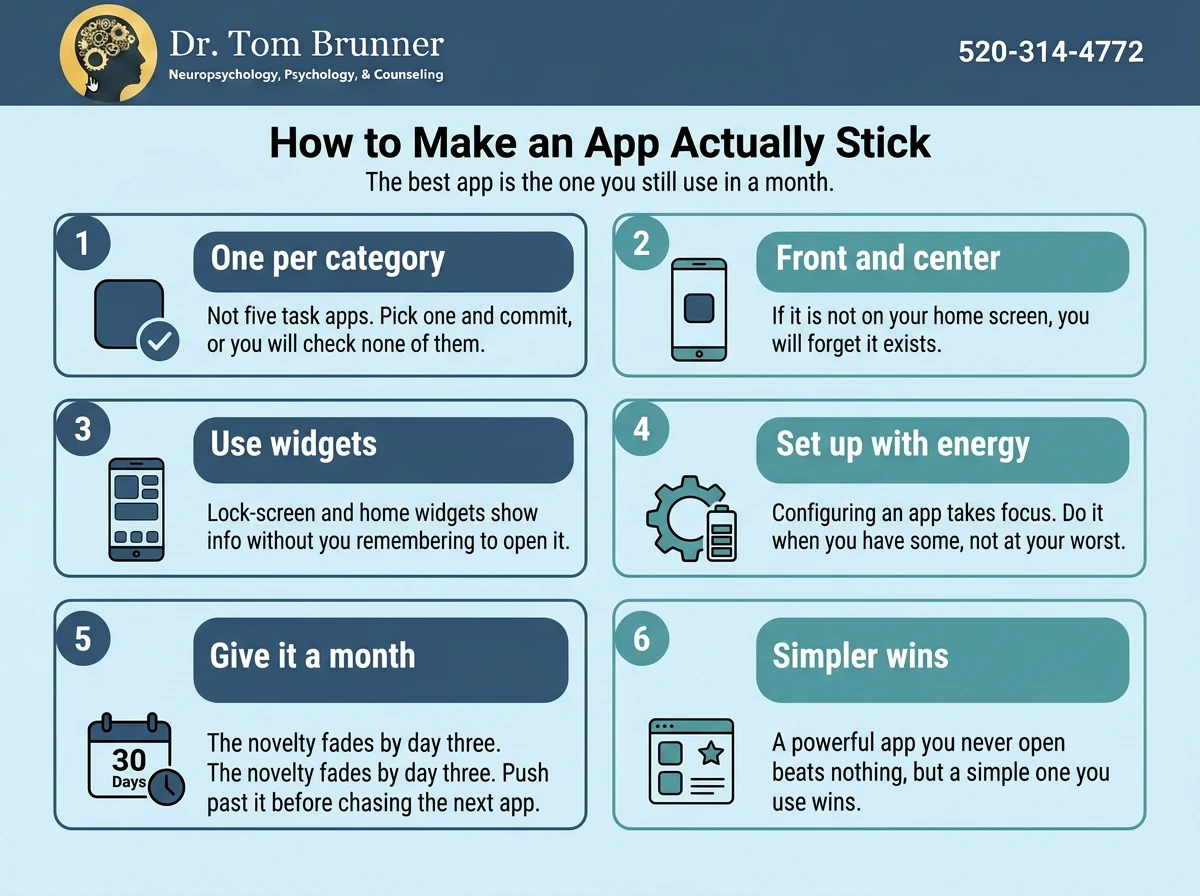
The thread running through all of these is lowering friction. Every extra tap, decision, or setup step is a chance for an ADHD brain to drift away. When a tool is easy to reach, quick to use, and gives you a visible payoff, it has a real shot at becoming part of your day rather than another icon you scroll past.
Above all, be gentle with yourself if an app does not stick. It does not mean you failed. It means that tool was not the right fit, and the next one might be. The goal is not a perfect productivity system. It is a little less friction in your day.
Frequently Asked Questions
What is the best free ADHD app?
It depends on your need, but several excellent tools are free or nearly so: Goblin Tools for breaking down tasks, Google Tasks and Google Calendar for simple lists and reminders, Focusmate for a few free body-doubling sessions a week, and Tiimo’s free tier for visual planning.
What is the best to-do list app for ADHD?
Todoist is the most widely recommended, thanks to its simplicity, fast capture, and free tier. TickTick is a strong alternative if you want a built-in calendar and focus timer. If those feel like too much, Google Tasks keeps it dead simple.
Do apps really help with ADHD?
They can, when matched to your specific challenge and used consistently. Apps provide external structure, reminders, and accountability that ADHD brains benefit from. But they are tools, not treatment, and they work best alongside strategies like therapy, coaching, or medication.
What is a body-doubling app?
A body-doubling app connects you with another person to work alongside, usually on video, so their presence helps you start and stay on task. Focusmate is the best-known example. Many people with ADHD find it one of the single most effective tools for beating procrastination.
Are brain-training games good for ADHD?
Mostly they are just fun. One exception is EndeavorOTC, an FDA-cleared game shown in trials to help attention in adults, but even that is meant to complement other treatment. Ordinary brain-training apps have weak evidence that their gains carry over to daily life.
Sources
The information in this article was drawn from the following reputable sources. Each link goes to the original publication.
ADDA: ADHD Tools for Adults. Nonprofit overview of body doubling, timers, and productivity tools for ADHD.
Children and Adults with Attention-Deficit/Hyperactivity Disorder (CHADD). National nonprofit with strategies and resources, including body doubling.
ADDitude. Long-running ADHD publication with app and tool reviews.
National Institute of Mental Health (NIMH): ADHD. Federal source on ADHD and evidence-based treatment.
The Bottom Line
The best ADHD app is not the fanciest one in the store. It is the one that removes your biggest daily blocker and that you will actually keep using. Match the tool to your struggle, whether that is starting tasks, remembering things, or sensing time, and pick just one per category.
A few standouts show up again and again: Todoist for tasks, Goblin Tools for breaking them down, Focusmate for getting started, Forest for focus, and a simple visual planner for time. Many have free versions, so you can test before you spend.
Remember that these tools are scaffolding around your day, not a fix for ADHD itself. Paired with real support and a little self-compassion, the right app can quietly make life run a lot smoother.